
Fix for IE crash on launching forms in Oracle Applications 11i (11.5.10)
Many of you would have noticed that while launching forms from Oracle Applications 11.5.10 using Internet Explorer (IE 7) then it might crash with following error. Though it may work perfectly fine in mozilla firefox.
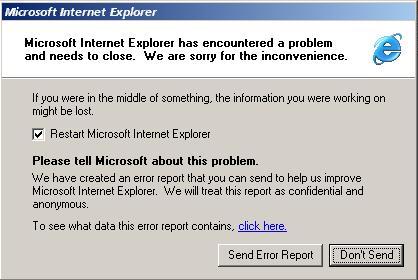
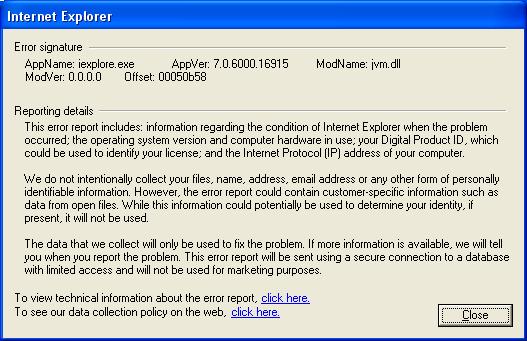
This is the working fix for the issue.
Solution-1:
1) Take backup of jvm.dll located at c:Program FilesOracleJInitiator 1.3.1.21binhotspot directory.
2) Copy jvm.dll from C:Program FilesJavajre1.6.0_07binclient (or whichever highest version of jre you have) to c:Program FilesOracleJInitiator 1.3.1.21binhotspot
3) Clear browser cache and also Oracle Jar cache (Remove all files from c:documents and settings<username>Oralce Jar cache)
4) Close all the browsers and restart
Enjoy !! The issue should have been resolved now !
Solution-2:
In case if you are unable to find the jvm.dll in that location or if the above solution didn’t work for you, you can download the working jvm.dll from this link.
OMG! Thank you so much
Gracias, funciono
Great it worked finally i saved my time thanks
thanks…..a lot…………
Thank’s a lot.
It worked with downloaded file
thanks it worked for me too :))
Thankz a lot buddy..!
Very Good Info!
Thanks a lot, It worked for meafter downloading a working dll file.
Worked fantastic for me! Thank you very much!
i have done this but didn’t work for me. but i found a solution that worked for me, and i just want to share it here coz the steps above really challenged me. first, you would want to go to TOOLS(im using ie6 by the way)>then Manage Add-ons. Disable the tool bars add-on (yahoo, MSN, smileys, etc.).
Thanks a lot, it worked!!
Thanks a lot…..very useful solution….
Thanks a lot, it worked.
Great! It worked! Thank You
Superb !! Saved my day.. Works like a charm.
Thanks a lot.