
Fix for “Internet explorer has closed this webpage to help protect your computer”
Many users face issue running Oracle forms on Microsoft Internet Explorer 8 (IE8) which causes the page to redirect to following url
res://ieframe.dll/acr_depnx_error.htm#<domain>,http://<server>:<port>/forms/frmservlet?config=<config>
It displays following error.
Internet explorer has closed this webpage to help protect your computer
A malfunctioning or malicious add-on has caused Internet Explorer to close this webpage.

Solution:
Please note that by implementing this solution although this specific problem would be resolved, however you must understand that this IE feature is enabled by default for securing your computer and removing this may expose to vulnerabilities so kindly understand the risk before making this change. However you can always revert to original settings.
Goto Internet Explorer -> Tools -> Internet Options -> Advanced -> Scroll down to Security -> Uncheck “Enable memory protection to help mitigate online attacks*”
Close all browser windows and restart the browser. The issue should have been fixed 🙂
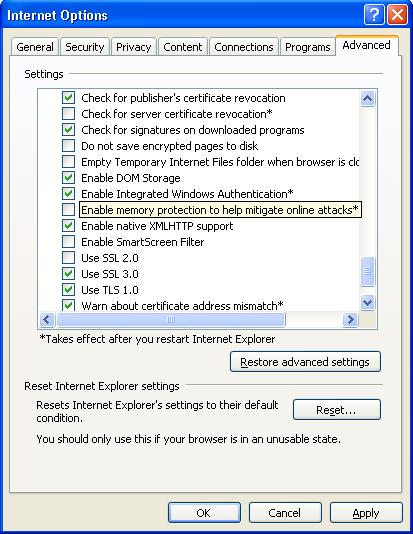
Edit: Alternatively you can use either of following 2 alternate solutions.
Alternate 2:
Open registry using start->Run->regedit->ok
Go to HKEY_LOCAL_MACHINESOFTWAREMicrosoftInternet ExplorerMain
On the right hand side you will see a DWORD key called DEPOff. IF this is set to value 0, just change it to 1 and close registry editor.
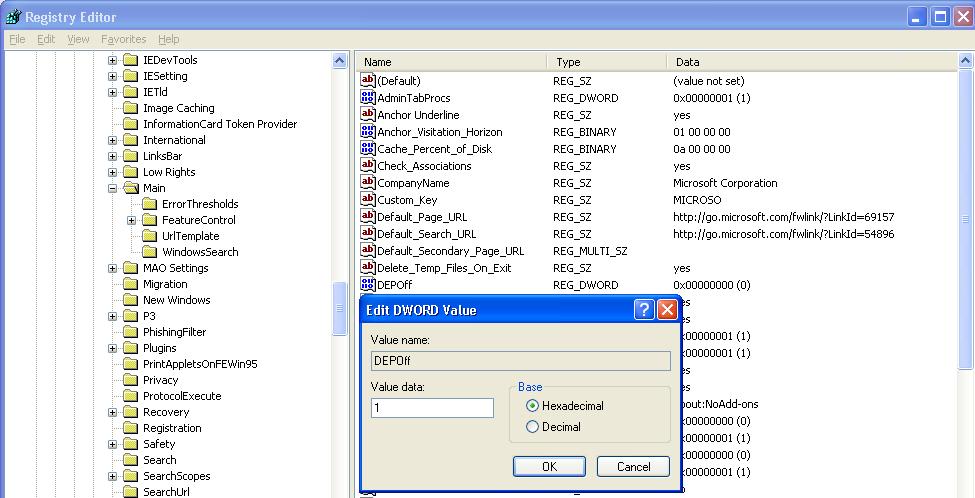
Restart Internet Explorer and check if the problem has been fixed or not.
Alternate 3:
Right click on My Computer->Properties (or start->Run->sysdm.cpl->ok)
Click on “Advanced” Tab. Click on “Settings” button next to Performance.
Click on last tab “Data Execution Prevention”
Select Second option and then select “Internet Explorer” from the bottom pan.
(If “Internet Explorer” is not already present there then just click on “Add” and then select “c:Program FilesInternet Exploreriexplore.exe”)
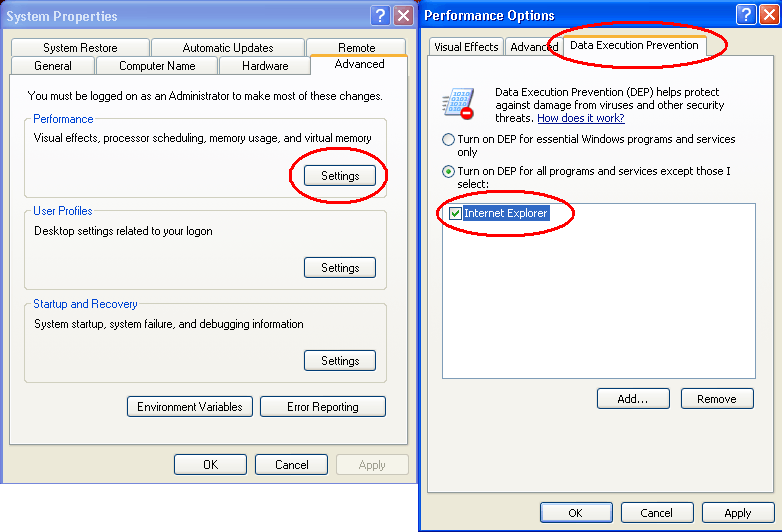
Click OK and restart internet explorer. The problem should have been fixed.
Thanks for sharing the very useful information about Oracle and please keep updating us, …..
This is not a solution! You suggest people to uncheck an option which will make their computer vulnerable to remote attacks. When you suggest or deploy a general knowledge or solution you should be more careful about the consequences. If any of these operating systems which became vulnurable would be infected because of your suggestion(s) they could charge you for all the harm you caused. No offence intended, just a friendly suggestion for further decisions.
Thanks for your suggestion. Although the text itself suggests that this feature is to “help mitigate online attacks” so use would already know by reading it, I would add the disclaimer as suggested by you.
Thanks
Tushar
Thank you so much..it wokred
“Enable memory protection to help mitigate online attacks*”
It won’t let me uncheck it.
Thanks for posting this great guide! I am sure this is very helpful for IE users.
am trying to install oracle J initiator 1.3.1.22 after deleting the oracle folder in program files but it keeps giving the error message ‘Error while registering oracle JInitiator 1.13.1.22 registry keys’ iv unstalled it but it still shows in the control panel
thank you………..
Excellent Article..Love it..Option 3 worked for me.. You saved ton of time for all of us. Keep up the great work.
Naveen
Thanks a lot
Thanks! It help me!
thanks buddy….it working……..thanks a lot
Hello.. I need a help..
I am unable to access EBS and oracle forms front end.. I have Java 6 installed in my pc.. JInitiator 1.3.1.22,1.3.1.26,1.3.1.28.. IE-10 but still i am unable to access the page.. Could you please help me to sort this problem…
I am getting an error “We are unable to return you to the page you were viewing”
Plz help..!!!!
Dear Rishi,
Please find the solution for the issue you are facing at following link.
http://www.oratraining.com/blog/2012/08/fix-for-we-were-unable-to-return-you-to-the-page-you-were-viewing-error-in-ie/
Regards
Tushar
Hi,
Im still facing the same problem.I applied Alternative # 3 solution.
But still i.e is not running forms.
Need help.
Regards,
God bless you … Thank you.. Solved it
Hi,
Currently I am using Window 8 x64 IE10. Cant use solution 1 and 2 because no such option. Solution 3 is not an option for Window x64.
When I go some website, I have this problem, “An add-on for this website failed to run”.
Any solution for this so I can run IE10 without downgrading IE with Window 8 x64.
Cheer
Thank u very much. This article helped me a lot…
Thank u very much. This article helped me a lot
I was able to resolve my login issue by this post.
thanks
It worked!!! Thanks so much!!! I tried every other way and they did not work, yours did, thanks alot
thank you this solved yet another problem I was facing with this desktop. had the windows update agent was missing error earlier and then the windows update site was redirecting me worked on this thing alllll night. no viruses was a new install from usb. . never had so much trouble putting xp back on something in my life. . would go to windows 7 but this machine doesn’t like windows 7 or vista, and 8 is just sorry an icky.
thanks alot team….its great solution….
Thanks for this post, i will try that.
Thank you very much fo this solution. I have searched many links but at last my search ends on this site.
Thanks again.
Dear installtion of new jvm.dll works. thanks for useful most and please one thing may i revert back all other changes or kept them.
Hi shahzad
Would you please tell me how you install jvm.dll.
Please tell me procedure.
Thanks & Regards
Rohit Naktode.
Ah well…why anyone would deliberately make their machine more vulnerable to Internet attack is beyond me.
Oracle should fix their software.
I deliberately turn fully on and enforce DEP domain-wide wherever I administrate.
I agree, it’s not a fix to lower the security barrier..
Fix it oracle!
Glad we could help !
Worked. Thanks.
Wooow this helps a lot, ive been trying to fix this for long.
Thank you, It helps me…..
Thanks very much!!!
Thank you so much……
Thanks Alot… First option itself resolved on my VDI
thanx
and finally DEPOFF is not in the list then add it .. it worked for me…
1st solution worked for me thnx..
sudheer
The same OS and the same problems. Nothing helped.
Grerat!!!! it worked for me 🙂
Its rocking man thanx it help me a lot…….
A lot of thanks but non is possible, I am working on windows 7 home premium 64 bit
1) in solution 1 Enable memory protection.. this option is checked and for sorry access denied and can not be unchecked !!!!
2) in solution 2 it says can not DEP this program in 64 bit system
3) and finally DEPOFF is not in the list
Thank you very much
PLZZZZZZ HELP
i only get this message when i am in my yahoo email and i click to get out of it…and then it happens…ONLY when in my email….?????
hey you’re brilliant! thank you!
@Ivan Itchybut
Yes we do understand your concern but the reason being Oracle and Microsoft being independent companies the newer versions of IE are not always compatible with older Oracle forms products. If they release new Jinitiator with new JVM files then you can always update your jinitiator to fix the issue but until that we need to use this fix/workaround.
Best regards
ORA Training blog admin
Thanks a lot, it solved my problem with SVUonline webdemo and IE 9 on windows 7 64bit.
Is this really a ‘fix’? So now I’m not protected against buffer overflows just so I can live with some Oracle funkiness??? Can’t Oracle fix something on their end so I don’t have to expose myself to Mr Internet?
Thanks, it was very useful and worked like a charm !!
Hello,
I tried allyour 4 solutions (3 alternatives + jvm.dll) and still it did not fix the issue. Also i dont think the administrator has locked the privelege as I can see the changes after browser restart but i am not sure if there is anything else as its the clients laptop and dont have Administrator password. I am trying to login into Oracle Discoverer. I have XP SP3, IE 8 (8.0.6001), jre1.5.0_10 installed on my laptop.
Please let me know if there is any other alternative to resolve this issue?
Thanks,
MJ
I Love you, very very very thanks. my problem resolved 🙂
After i made the above said changed, the WS_Ftp Pro software started closing down, it is shutting down automatically when trying to connect.
We have an Asset Management Program under Oracle that was the only one that was responding with the above error and would not let us log in. I applied the first alternative and now could log in without an issue. But, My concern is, if we disable the memory protection from online attacks, wouldnt that alow internet online attacks and not protect the computer? Would it be better to use alternative 2 then add and select the Asset Management program by turning on the DEP for all except the Asset Management Program? Thanks, this has been very helpful!
Thanks,,,I appreciate it,,,it worked for me
Thanks a lot..This really is a fix of substance….
Thanks it helped.
Thanks this really helped out to resolve my issue
THANKS
@admin
Its working… superb…. Thanks buddy…
Thanks a lot. From last two week i am trying to solve this problem. Now its working prefectly.
Thank you very very much JVM.DLL solved the problem but the form is not showen because of this error ORA-12560: TNS thanks once again.
Hi Dear Admin,
Happy New Year!
I am facing the same problem on Windows 7 (IE8). Could you please advise me how to unchecked this only grey out box? I am the administrator for my notebook.
Thanks in advance
As I mentioned in the alternate solution above for windows 7, right click on internet explorer in start-programs and then click “Run as administrator”. This will make the checkbox enabled for changes.
Regards,
ORA Training admin
hi guys
my details are the same as #35. forms 10gr2, jini 1.3.1.22, win xp prof ver 2000 sp3, ie8 etc
i’ve tried everything suggested here as well as things that i thought of but to no avail.
also made an entry for the locat host into the hosts file that i think is being used by the system but no luck.
i suspect that the system admin have setup a company wide policy to use a default loopback ip address to stop people going to undesired sites.
any other suggestions will be much appreciated.
regards
MA
You can not imagine the nightmare I had with “Internet explorer has closed this webpage to help protect your computer” until I found your website!! My husband about brained me for installing SP3. From then on he was not able to log onto his worksite. I can not thank you enough for your 3 steps on how to clean this mess up!! The first one worked for me! So easy and simple to do! Why does MS not tell you this on their site??? I hope that you are here for years to come, because I plan on visiting this often!!
Glad that we could help you fix the problem.
– ORA Training admin
Thank you so much, to enable us to fix the problem ourselves.
@NAM009
Thanks a lot for your comments. Glad that we could help fix the problem.
ORA Training Admin
Hi All,
I had the same problem but under WinXP Prof SP3, IE8, Oracle 10g forms and JInitiator 1.3.1.22 environment and just fixed following ORA Training admin indications with regards to JInitiator – June 8th, 2010 at 11:16 | #11.
I dont know what changes has been made on the jvm.dll file but after replacing the file it worked.
I think this is one of the most workable solutions insted of touching the registry or changing the security level.
Many thanks to the creator of this blog and to it’s administrators / ORA Training admin
whenever I close internet explorer (i’m using windows 7) I get the message:
Internet Explorer has stopped working
Great!!! it works for me.
i found it. but its kinda faded and the check mark wont uncheck and looks like its permanantly there. and the other stuff, i cant find on my computer. its brand new. can anybody help me? my facebooks Drew Jaceal so if u could just send me a message i would REALLY REALLY appreciate it. i cant close my internet and im having a real problem with it =T
Thanks!! – Drew J. W.
@gopal
Glad that we could help you fix your issue. Keep visiting ORA Training and ORA Support.
– Admin
thanks a lot!!!!!….. this solution worked for me as well.
valuable post.
@govand
Glad that we could help you.
ORA Training Blog admin
Thanks, that is worked fine.
@admin
Thanks for nice solution. It works well on windows 7 but unfortunately it doesn’t work on windows vista. Have you any solution for this?
Regards
anjam
@Irene
I have updated the post with alternate options to fix your issue. Please check it out.
Thanks
Hmm.. I am logged in as the laptop’s administator. And, this option is the only one that is grayed out among all of those boxes.
Well, in my case, I’m the administrator for this laptop of mine. I have no idea what to do :S
I am sure you would have checked but please make sure once again if the user you are logged in as in part of your computer’s administrator group. If it is there then please let us know if only this option is grayed out or all of them. Also you can create a support ticket at support.oratraining.com so that I can assing someone for you. This is free of cost.
You stated there to check if theres any group policy st at domain level to prevent changes in IE settings. What does that mean? How do I check? Sorry :S
Sometimes the domain administrators set windows policies for all users which will set fixed options in internet explorer which may have the option checked. In this case even if we change the option, on next login it will reset the option. In your case if it is grayed out, most likely it is related to admin privileges on the computer.
– ORA Training admin
Oh. I found the solution above. And sorry for double posting.
Glad that it worked for you. Have a good day
It doesnt work for me. For some reason, my box seems to be.. Its checked. But I cant seem to uncheck it. Its in gray color now. WHY?:O
it worked.. thanks a lot!!
@Tami Powell
Are you having administrator privileges on the system? If not, ask the administrator to do it for you or else check if you have any group policy set at domain level to prevent changes in IE settings.
Thanks!
I am unable to uncheck “Enable memory property to migrate online attacks”. It is checked in the list but and the sentence is shaded, why is that? When I try to uncheck it I am not able to. What should I do now?
Thanks!
@Tom
Thanks Tom.. Glad that we could help you !!
Keep visiting us for the latest posts.
Thanks very much, this sorted it for me. Other sites had complicated instructions that failed to fix. Thanks again :-)))))
Dear Kiran,
Please download the jvm.dll file from following location and copy it to C:Program FilesOracleJInitiator 1.3.1.21binhotspot directory or equivalent Jinitiator directory. Make sure to rename existing file in this location and then try again after closing all your brower windows.
http://blog.oratraining.com/files/jvm.dll
Regards,
ORA Training admin
Hi even though i made changes to the security settings on the Advanced tab,I still have the same issue.I cannot open the Oracle Forms.Any suggestions.Thanks
Thanks bro… it did worked… Bravo!!!
@admin
Didnt work in my case even after restarting the browser.
This error is coming the moment Oracle Formsa are launched. Win 7, IE 8
@bryn_ie8team
Thanks a lot Bryn. Glad to know that Microsoft IE team appreciates this.
the solution worked fine on ie8 but still firefox crash there is any fix to firefox
This is not helping me. I have installed windows 7 and tried to run application built on oracle application 10g
Exactly, this solution applies to the same error. Please let us know if this does not work.
Many users face issue running Oracle Application 10g forms on Microsoft Windows 7 [Internet Explorer 8 (IE8)] which causes the page to redirect to following url
res://ieframe.dll/acr_depnx_error.htm#araidc.local,http://oraapps.araidc.local:7777/forms/frmservlet?config=arai
It displays following error.
Internet explorer has closed this webpage to help protect your computer
Excellent ! Why doesn’t Oracle publish this? We had tough time troubleshooting this.
Thanks a lot
Thanks for posting this great guide! I am sure Internet Explorer users will find this handy!
Cheers,
Bryn
IE Outreach Team